
teamLab
TeamLabArt & Design
4.650.00 Reviews
- Version
- 3.8.2
- Installs
- 1.00M
- Age Rating
- Everyone
Screenshots
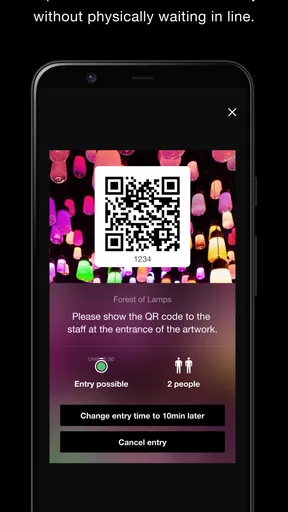
Our Review of teamLab
 Analysis by Appyee
I approached teamLab as an art companion rather than a conventional drawing or gallery app. That distinction matters. It is designed around the teamLab exhibition experience, so its value depends less on filling spare minutes with creative tools and more on helping visitors understand, prepare for, and extend an encounter with immersive digital art. In my experience, that makes it unusually focused within the Art & Design category: it is not trying to replace a sketchbook, a museum guide, or a social feed.
The app is free, suitable for Everyone, and developed by TeamLab. It has reached over a million installs and holds a 4.6 average from around three thousand ratings, which suggests that its narrow purpose still connects with a substantial audience. I would recommend it most readily to someone planning a teamLab visit, accompanying children, or wanting a little more context around an exhibition. I would not choose it as a general-purpose art-learning app, because it does not appear to be built for making, editing, or organizing your own artwork.
How the exhibition app fits into a real visit
I find this app most useful when I treat it as a shared starting point for a visit, rather than something everyone needs to explore separately. Before setting out, I’d use it to agree on what the group is curious about; next, I’d consider how each person’s phone use and expectations fit into the outing. That small bit of coordination can keep the exhibition itself at the center.
A useful companion before you leave home
The first practical use is preparation. Before visiting an exhibition, I would open the app somewhere quiet and use it to establish what kind of experience I am about to have. Immersive art can be difficult to explain with a conventional checklist: the appeal often comes from movement, light, sound, scale, and the way visitors occupy the space. A dedicated companion is better suited to setting that expectation than a standard map or a quick image search.
That preparation is especially helpful for families. A child may expect a normal gallery with framed pictures, while the actual visit may feel closer to walking through a changing environment. Showing the app beforehand gives parents a natural way to talk about looking carefully, moving respectfully, and noticing how the work changes around them. I found that this kind of preparation can make the visit feel more intentional without turning it into a lesson.
For adults, the benefit is different. The app can act as a prompt to slow down. Instead of treating every room as a photo opportunity, I would use it to decide what details deserve attention: transitions between spaces, recurring natural imagery, or the relationship between the visitor and the projected environment. That is a small but meaningful difference from relying only on a venue page or a search engine result.
What it adds while you are there
During a visit, a companion app has to stay out of the way. Nobody wants to spend the best part of an immersive installation staring at a phone. The strongest role for this app is therefore occasional reference, not constant use. I would check it before entering a space, during a pause between areas, or afterward when I wanted to remember what I had seen.
This also creates a useful trade-off. A traditional audio guide often asks you to listen continuously, while a general gallery app may encourage you to read labels for every work. A teamLab-focused app can be more flexible if you treat it as a companion rather than a script. You can look briefly, put the phone away, and return your attention to the physical experience. For this type of art, that is the healthier workflow.
One practical tip is to avoid opening it for the first time in the busiest part of the venue. I would explore the interface before arriving, while connected to a reliable network, and keep the phone available for short checks rather than trying to navigate it with one hand in a crowded room. That simple habit reduces friction and helps preserve the atmosphere the app is meant to support.
Why the focus is different from ordinary art apps
Most apps in this category fall into one of three groups: drawing tools, image editors, or catalogues of artists and artworks. This one belongs to none of those groups in the usual sense. Its focus on teamLab exhibitions gives it a narrower identity, but also a clearer reason to exist. It is not asking me to create a digital painting or learn color theory. It is helping me connect a particular exhibition experience with information and reflection.
That makes the comparison with a museum audio guide slightly unfair but still useful. An audio guide is often better when I want a linear explanation of individual pieces. A general gallery website may be better when I need opening details or broad planning information. A camera app is obviously better for recording my own visual memories. The teamLab app makes the most sense when I want something specifically tied to teamLab’s immersive approach rather than a universal art utility.
Its main strength is focus, not breadth. If you understand that before downloading it, the app is easier to judge. Someone looking for brushes, layers, filters, tutorials, or portfolio tools should skip it and choose a creative suite instead. Someone attending a teamLab exhibition may find that a focused companion is more useful than a feature-heavy art platform that has no relationship to the visit.
What the current version tells me about its direction
The current version is 3.8.2, and the app was released on June 10, 2018. Those details place it in the category of an established companion rather than a brand-new experiment. I read that as evidence of continuity: TeamLab has kept the exhibition app available through multiple stages of its life instead of treating it as a temporary promotional download.
That history also changes how I evaluate it. With a mature app, I care less about flashy novelty and more about whether the basic experience remains dependable. Does it help me orient myself? Does it feel connected to the exhibition rather than like a generic advertisement? Does it remain understandable for a first-time visitor? Those are the questions that matter more here than the presence of endless new tools.
The version number is also a reminder not to confuse maintenance with reinvention. A later version can indicate ongoing work, but it does not automatically mean the app has become a full digital art platform. In my view, its evolution should be judged by how well it supports the exhibition journey. If updates keep the content relevant and the experience clear, that is more valuable than adding unrelated features simply to make the app look larger.
How existing users may feel the evolution
For someone who has used the app before, the biggest advantage of an established release is familiarity. A returning visitor does not necessarily want to relearn everything. A stable companion can make it easier to revisit an exhibition or prepare for another teamLab experience without starting from zero.
There is a subtle benefit here for repeat visitors. The first visit is often about surprise and sensory discovery. A later visit can be more analytical: I may pay attention to how one installation leads into another, how my movement changes what I see, or how children and adults respond differently to the same space. An app that remains available between visits can support that shift from first impression to deeper observation.
At the same time, returning users should keep their expectations realistic. An exhibition companion cannot preserve the entire feeling of being there. A screen can remind me of a concept, but it cannot reproduce the scale, darkness, sound, motion, or shared presence of the physical venue. I would use the app to refresh my memory and plan my attention, not as a substitute for returning to the exhibition itself.
Another useful workflow is to make a short note immediately after leaving. The app can provide the prompt, but my own memory is often more personal than any official description. I might record which area affected me most, what changed when other visitors entered the space, or which detail I missed the first time. This turns a quick download into a small reflection tool without pretending it is a full journal.
Where the experience may feel limited
The same specialization that makes the app distinctive can make it feel limited. If I am not planning to visit a teamLab exhibition, the reason to keep it installed becomes much weaker. It does not offer the open-ended usefulness of a drawing app that I can use every day, nor the broad reference value of a general art encyclopedia.
I also would not rely on it alone for complete trip planning. A companion focused on the exhibition experience is not necessarily the best place to handle every practical question about travel, accessibility, timing, or local arrangements. I would use the app for its teamLab-specific role and check the relevant official venue information separately when making detailed plans. That division of labor is more sensible than expecting one small app to cover the entire outing.
There is also a potential attention problem. Any phone use inside immersive art can interrupt the very thing I came to experience. Even a well-designed companion becomes counterproductive if I keep checking it between every visual change. My advice is to decide in advance when the phone is useful and when it should remain in my pocket. The app works best as a quiet guide, not as the main event.
People who need a highly structured explanation may prefer a conventional guide with longer text or continuous narration. Conversely, people who want only a quick visual preview may find a dedicated app more than they need. The right choice depends on the kind of visit: reflective and exploratory visitors are likely to get more from it than people who want a simple list of opening information.
Everyday scenarios where it earns its place
Imagine I am taking two children to an exhibition on a weekend. Before leaving, I use the app to introduce the idea that the artwork may react visually to movement and that the rooms are meant to be explored patiently. On the journey, I answer their questions using the app as a shared reference. At the venue, we stop checking the phone and focus on the spaces. On the way home, we compare which parts each person remembers. That is a realistic, balanced use: preparation, occasional support, and reflection.
A second scenario is a solo visit. I might open the app over breakfast, choose a few things to notice, and then treat the exhibition as a slow visual walk rather than a race through rooms. Afterward, I can revisit the app to connect my impressions with the broader teamLab context. For a solo visitor, that extra framing can prevent the experience from becoming a blur of impressive images.
It could also help a teacher, art student, or design enthusiast prepare discussion points. The app is not a replacement for criticism or classroom material, but it can provide a shared starting point for talking about digital environments, participation, and the boundary between artwork and architecture. The important limitation is that the discussion should still be grounded in the actual visit, because screenshots and descriptions cannot convey the whole work.
Who should download it, and who should pass
I would download it if I had a teamLab visit planned, was deciding whether the exhibition suited my family, or wanted a focused way to revisit the ideas behind an immersive art experience. The free price removes the usual trial barrier, and the Everyone age classification makes it easy to consider for mixed-age groups.
I would pass if my goal were to draw, edit photos, find daily creative prompts, or build a portfolio. Those tasks call for dedicated creative software, and this app’s exhibition focus would not serve them well. I would also pass if I dislike using a phone during cultural visits; in that case, a printed guide or simply experiencing the venue without digital support may be more satisfying.
The app is most valuable when there is a clear connection between download and destination. That may sound obvious, but it is the key decision point. A million-plus install base shows that many people have found a reason to use it, yet popularity does not turn a specialized companion into a universal art tool. I would judge it by relevance to my plans, not by install count alone.
What I would watch in future updates
For future development, I would like TeamLab to preserve the app’s calm, focused role while making the visitor journey even clearer. The most useful improvements would be those that help people prepare without overwhelming them, return to ideas after a visit, and understand how to use the app without spending too much time on the screen.
I would also watch how well the current version keeps pace with the exhibitions it represents. A companion remains valuable only when its relationship with the physical experience feels alive and coherent. If the app becomes mostly a static brochure, its advantage over a normal website becomes smaller. If it continues to guide attention and encourage thoughtful observation, its specialized design remains justified.
My overall view is positive but specific. This is a free Art & Design app from TeamLab that works best as a bridge between a person and a teamLab exhibition. Its 4.6 average and broad install reach make it easy to take seriously, while the mature 3.8.2 release suggests an established product rather than a disposable event tool. I would recommend it to planned visitors, families, and curious art lovers who want context without turning the visit into a lecture.
I would not recommend installing it just because it appears in an art category. It is not a replacement for creative software, a universal gallery guide, or the physical exhibition. Used with the right expectations, though, it can improve the rhythm of a visit: prepare briefly, look closely, put the phone away, and reflect afterward. That balance is where the app makes its strongest case.
Verdict
Strengths of teamLab
- Immersive digital artworks create a memorable and visually striking experience.
- Interactive exhibits encourage visitors to explore and engage with the surroundings.
- Suitable for families, couples, and visitors of different ages.
- Frequent photo opportunities make it appealing for social media sharing.
- The app can help users discover information about teamLab venues and exhibits.
Limitations of teamLab
- Some exhibits may feel crowded, especially during weekends and peak hours.
- Tickets and travel costs can make the overall experience relatively expensive.
- Certain artworks may be unavailable during maintenance or venue changes.
- The experience depends heavily on the physical venue, not just the app.
- Large installations may be overwhelming for visitors sensitive to light or motion.
Similar Picks in This Category
View All
Canva: AI Photo & Video Editor
Canva4.8

PENUP – Drawing-sharing SNS
Samsung Electronics Co., Ltd.4.5

Crafto
Kutumb App4.6

Sketchbook
Sketchbook4.1

ibis Paint X
ibis inc.4.5

Adobe Express: AI Photo, Video
Adobe4.6
Frequently Asked Questions
What is teamLab, and what can I do with the app?
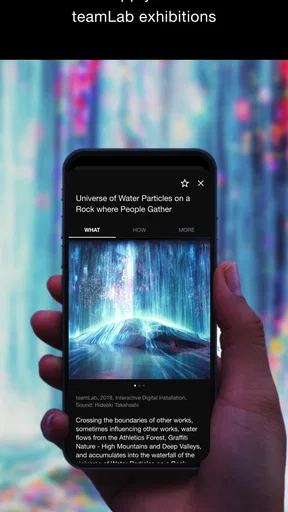
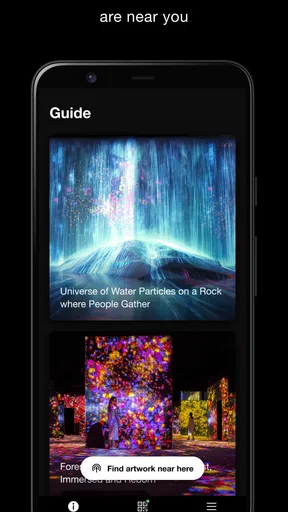
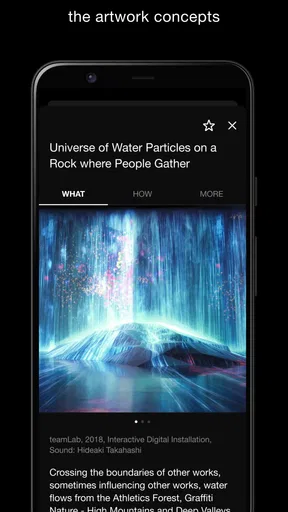
teamLab is a digital platform associated with teamLab’s immersive art experiences and related visitor information. Depending on the version and location, it may help you explore exhibitions, view artwork details, access venue guidance, read announcements, and prepare for a visit. The exact features can vary by country, exhibition, and app update, so check the current listing and venue information before downloading.
Is teamLab free to download and use?
The teamLab app may be available to download at no charge, but downloading the app does not necessarily provide free entry to a teamLab exhibition. Tickets, reservations, special events, and additional experiences can require separate payment. Some features may also depend on the venue you plan to visit. Always review the official ticket conditions, opening hours, and pricing before making travel arrangements.
Do I need the teamLab app to visit a teamLab exhibition?
In most cases, the app is not necessarily a strict requirement for entering a teamLab venue, since admission is generally based on a valid ticket or reservation. However, it can be useful for checking exhibition information, understanding the venue, and receiving updates. Requirements may differ between locations, so confirm the latest instructions for the specific teamLab exhibition you intend to visit.
Does teamLab work offline, or do I need an internet connection?
Some basic information may remain accessible after it has loaded, but many app functions can require an internet connection, including updated announcements, online content, ticket-related information, maps, or interactive features. For the smoothest experience, use the app while connected to reliable Wi-Fi or mobile data. It is also wise to save essential booking details separately before arriving at the venue.
What permissions and devices are required for teamLab?
The requirements depend on the app version and the features offered by the exhibition. teamLab may need access to internet connectivity and, for certain functions, device capabilities such as the camera, notifications, or location services. Review the permission requests during installation and enable only what you are comfortable using. Check the Google Play or App Store listing for supported operating-system versions and device compatibility.
